CRMs and ERPs |
  
|
CRMs and ERPs |
|
To interface software such as CRMs or ERPs, you need to allow access to almost all data in the QDV7 files:
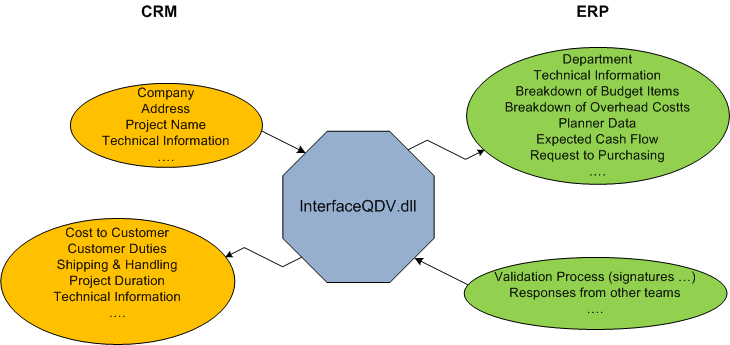
For this purpose, QDV7 comes with a DLL component (Dynamic Link Library) which enables you, among other features, to:
▪Extract overhead workbooks as Excel files from any version of an estimate
▪Extract WBS workbooks as Excel files from any version of an estimate
▪Extract BoQ workbooks as Excel files from any version of an estimate
▪Read any global variable value from any version of an estimate
▪Write any global variable value to the latest version of an estimate
▪Read values from any column of any task of the WBS, regardless of the version
▪Read values from any column of any row of the minutes, regardless of the version
▪Read nomenclatures sorted upon your choice
The DLL component is installed in QDV7 main directory and named InterfaceQDV.dll
The component is a library written using Microsoft .NET technologies but it is also COM compliant so that it can be called from almost any programming language.
Data is exposed by the DLL in a simple way (flat) which hides the complexity of data organization being in the file. You get simply one table for the WBS and one for the minutes, whatever the count of fields or the set of fields you have in the estimate.
Topic content
The QDV Interface Component Model
Installing Stand-Alone Component